
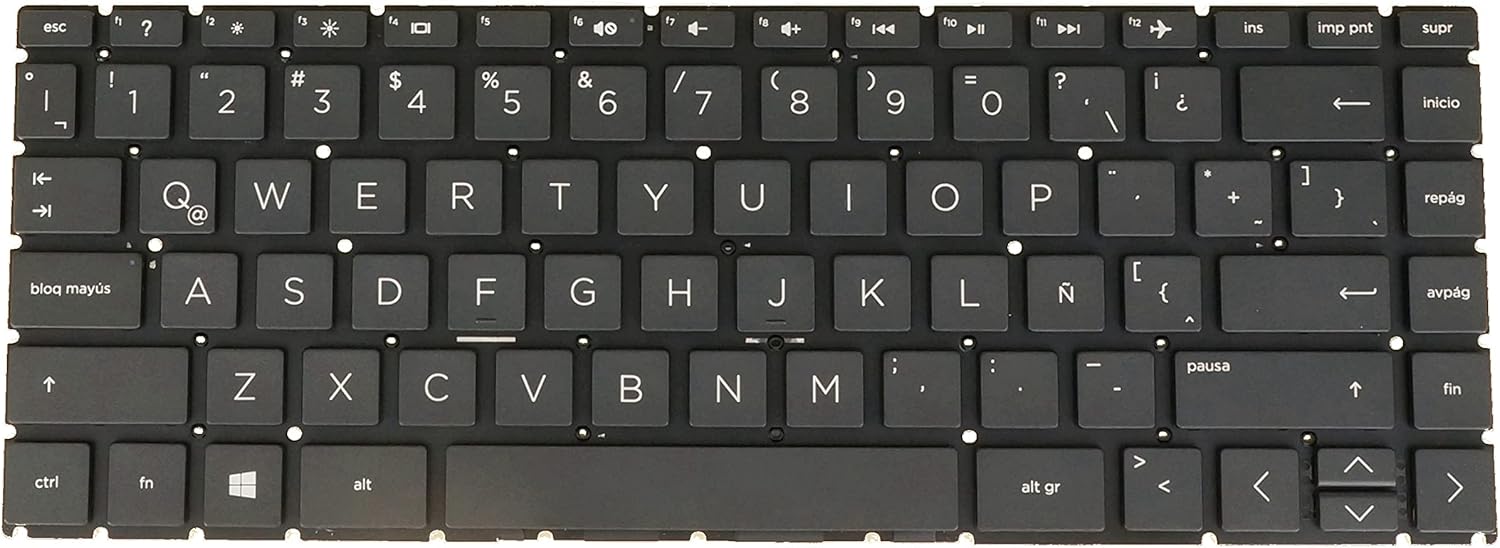
Latin Spanish Keyboard for HP Pavilion X360 14-cd 14t-cd100 14m-cd0000 14-dd0000 14m-dh0000 L23239-161 L15599-161, No Backlit Black
€8.40
Preis bei Onlinekauf
Kostenloser Versand
30 Tage kostenlose Rückgabe
Verkauft und versendet von iota-solutions.fr
Wir bemühen uns, Ihnen genaue Produktinformationen anzuzeigen. Hersteller, Lieferanten und andere stellen die hier gezeigten Angaben bereit.
€8.40
Preis bei Onlinekauf
Kostenloser Versand
30 Tage kostenlose Rückgabe
Verkauft und versendet von iota-solutions.fr
30 Tage kostenlose Rückgabe Details
Produktdetails
| Artikelnummer | 217024559 | Erscheinungsdatum | 2026/04/19 | Listenpreis | €8.40 | Modellnummer | 217024559 | ||
|---|---|---|---|---|---|---|---|---|---|
| Kategorie | |||||||||
- [Compatible] Many laptop model names are quite similar, but they are not exactly identical. You can utilize the 'CTRL+F' shortcut keys to ensure that the keyboard model we offer matches your laptop's precisely.
- [High Quality] Our keyboards have been tested. They feature responsive keys for smooth typing, clear characters on the keycaps, and a comfortable tactile feel.
- [Item specifics] Brand: AzubayCom || without Frame or without Cover || without Backlight || Black Color || LA Latin Spanish (Español Latino) Layout
- [Key Hinges] If you're purchasing a keyboard for the purpose of swapping the keycaps, please contact us to check the design of the key hinges.
- [Installation] The process of installing the keyboard is rather intricate and demands practical skills. (It might even require welding tools to melt the plastic points.) We strongly recommend that you understand the installation process before your order.
- [Reconnect] Before installing the keyboard, please clean the keyboard connector cable using alcohol wipes. If certain keys don't function properly, it's likely that you haven't connected the ribbon cable of our keyboard to your laptop properly. In such a case, please try reconnecting it several times.
Korrektur der Produktinformationen
Wenn Sie Unvollständigkeiten oder Fehler in den Produktinformationen auf dieser Seite bemerken, nutzen Sie bitte das Korrekturformular unten.
KorrekturanfrageKundenbewertungen
4.9 von 5
★★★★★
134 Bewertungen | 55 Rezensionen
So wird die Artikelbewertung berechnet
Alle Bewertungen anzeigen
Sortieren nach
Für dieses Produkt liegen derzeit keine schriftlichen Bewertungen vor.